


Best Caching for WordPress: Why It Matters and How Professional Setup Makes All the Difference
Website speed is no longer a nice to have. It is a critical ranking factor for search engines, a major influence on user experience, and a key driver of conversions. If you run a WordPress website and want it to load faster, perform better, and rank higher, implementing the Best Caching for WordPress is one of the smartest investments you can make.
In this article, we explain what caching is, how it works, and why caching is essential for WordPress websites. We also outline how Edge Web Design can help you implement and configure a professional caching solution that is tailored to your website, hosting environment, and business goals.
What Is Caching?
Caching is the process of storing a temporary version of your website’s content so it can be delivered to visitors more quickly.
Normally, when someone visits a WordPress website, several things happen behind the scenes. The server processes PHP code, the database is queried for content, themes and plugins are loaded, and images, scripts, and stylesheets are requested. All of this takes time, and when many users visit your site at once, performance can suffer.
Caching reduces this workload by saving a pre-generated version of your pages and serving them instantly to visitors. Instead of rebuilding the page every time, your server delivers a cached version, resulting in faster load times and improved performance.
How Caching Works on WordPress Websites
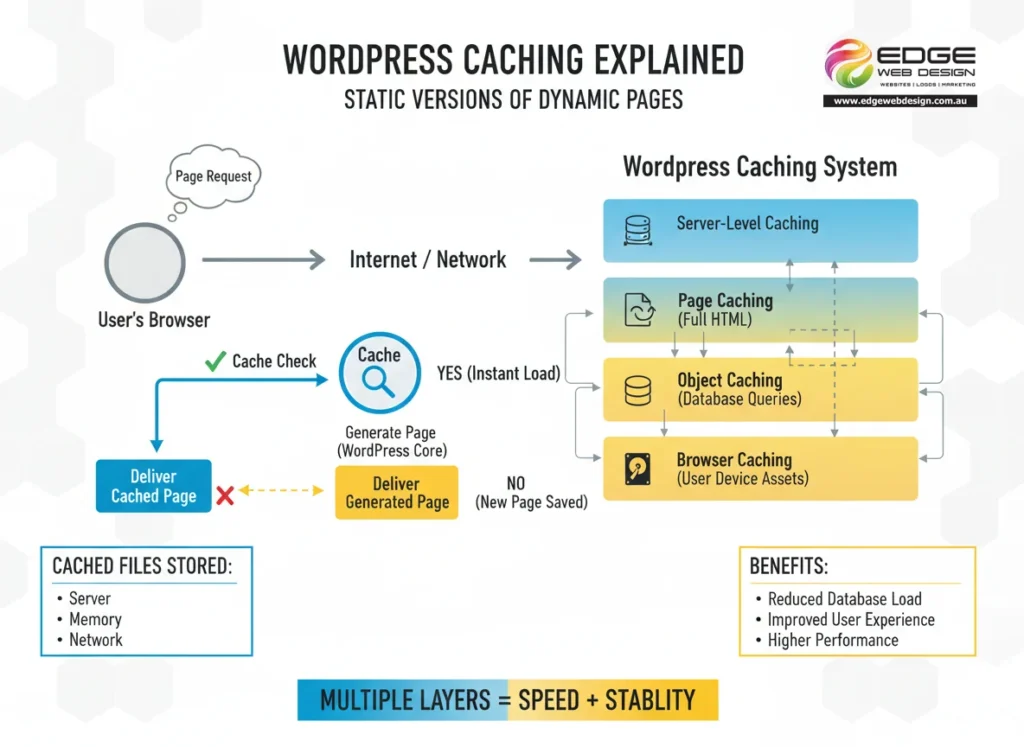
WordPress caching works by creating static versions of dynamic pages. These cached files are stored either on the server, in memory, or at the network level.
When a visitor requests a page, the caching system checks if a cached version exists. If it does, the cached page is delivered immediately. If not, WordPress generates the page and stores it for future use.
Achieving the Best Caching for WordPress typically involves multiple layers working together, including page caching to store complete HTML pages, object caching to reduce database queries, browser caching to store assets on the user’s device, and server-level caching for maximum performance. When configured correctly, these layers dramatically improve website speed and stability.
Why Caching Is Essential for WordPress Performance
Faster Load Times
Speed is the most obvious benefit of caching. Faster websites keep visitors engaged, reduce bounce rates, and encourage users to explore more pages. Even small delays can result in lost traffic and missed opportunities. Implementing the Best Caching for WordPress ensures your website loads quickly, even during high traffic periods.
Improved Search Engine Rankings
Google uses page speed and Core Web Vitals as ranking signals. These metrics measure loading performance, interactivity, and visual stability, all of which are heavily influenced by caching. A properly configured caching system helps your WordPress website meet these benchmarks, increasing your chances of ranking higher in search results.
Reduced Server Load
Without caching, your server must process every request from scratch. This increases CPU usage, memory consumption, and database activity. Caching reduces server strain by serving static content, leading to greater stability during traffic spikes, a lower risk of downtime, and better performance on managed and shared hosting environments.
Better User Experience
Visitors expect websites to load quickly and function smoothly. A slow website can damage trust, credibility, and brand perception. Caching improves the overall user experience by ensuring faster page transitions, smoother navigation, and reliable performance across desktop and mobile devices.

Increased Conversion Rates
Website speed has a direct impact on conversions. Faster websites convert better, whether the goal is lead generation, bookings, or online sales. By implementing the Best Caching for WordPress, you create an environment where users are more likely to stay, engage, and take action.
Why Professional Caching Configuration Matters
Caching is not a one-size-fits-all solution. Every WordPress website is different, depending on the hosting environment, theme and plugin stack, content structure, and traffic patterns.
Incorrect caching configuration can lead to issues such as broken layouts, logged-in users seeing incorrect content, outdated pages being displayed, or conflicts with plugins and server resources. This is why professional setup and management are essential to achieving the Best Caching for WordPress without compromising functionality.
How Edge Web Design Helps You Achieve the Best Caching for WordPress
At Edge Web Design, we specialise in optimising WordPress websites for speed, reliability, and search engine performance. Caching is a core part of our performance optimisation services.
We begin with an expert assessment of your website and hosting environment to determine the most suitable caching approach. Your caching system is then configured specifically for your website, ensuring compatibility with your theme, plugins, and business requirements.
Caching is integrated with broader performance improvements such as asset optimisation, database efficiency, and server-level enhancements. We also provide ongoing support and monitoring to ensure your caching system continues to perform optimally as your website grows and evolves.
By working with Edge Web Design, you gain peace of mind knowing your WordPress website is fast, stable, and professionally managed.
Why the Best Caching for WordPress Is a Long-Term Investment
Caching is not just a technical improvement; it is a strategic investment in your website’s future. A fast, well-optimised WordPress website ranks better in search engines, converts more visitors into customers, delivers a better experience across all devices, and scales more easily as your business grows.
With professional configuration, caching becomes a strong foundation for long-term digital success.
Final Thoughts
If you want faster load times, improved SEO performance, and a more reliable WordPress website, investing in the Best Caching for WordPress is essential. When implemented correctly, caching transforms how your website performs for both users and search engines.
Edge Web Design provides expert caching setup and performance optimisation services tailored specifically for WordPress websites. If your website is slow, unreliable, or struggling to rank, professional caching configuration could be the missing piece.
